




Microsoft Project 2024 Professional (PC) REINSTALLABLE Digital License
€35,00
Genuine License
Authentic product and money back guarantee.
Digital product
The key and instructions will be sent by email.
Microespana.com – Microsoft Certified Partner
Guaranteed secure payment
Digital License

1 – Buy
Shop securely with SSL encryption.

2 – Receive
You will receive the key and download link instantly.

3 – Download
Download and install the software.

4 – Activate
Enter the software license key.
Download from setup.office.com
License Type: Lifetime for 1 PC
- Pre-designed templates help you start your project on the right foot.
- Synchronize with Project Online and Project Server
- Submit timesheets to record time spent on project and non-project work.
- Run what-if scenarios to get the most out of your task assignments
- Automatically fill in start and end dates based on dependencies
- Visually represent complex timelines with multiple integrated timelines
- Licensed for 1 PC
System Requirements:
Processor 1,6 gigahertz (GHz) or faster, 2 cores Operating System Windows 10, Windows 11, Windows 10 LTSC 2019, Windows Server 2019, Windows Server 2022 Conference proceedings 4GB RAM; 2 GB RAM (32 bit) Hard drive space 4,0 GB of available disk space Show Screen resolution 1280 × 768 Recorders DirectX 10 graphics card for graphics hardware acceleration Additional system requirements Internet access Microsoft accountConsult office.com/systemrequirements o https://www.microsoft.com/en-us/microsoft-365/microsoft-365-and-office-resources?ms.url=m365cominformation&rtc=1#coreui-heading-1hdaxqh for the full list of system requirements.
Add to Cart
DOWNLOAD
Download the program from the following download link
| LANGUAGE | 32 BIT | 64 BIT |
| GERMAN | Download | Download |
| ENGLISH | Download | Download |
| FRANÇAIS | Download | Download |
| ITALIAN | Download | Download |
| SPANISH | Download | Download |
This EXE file is the official basis for installing the Microsoft Project 2024 Professional product.
SYSTEM REQUIREMENTS
Before starting the installation, make sure your PC meets the following minimum requirements:
- Processor 1,6 GHz or higher (32-bit x86 or 64-bit x64).
- 2 GB of RAM (for 32 bits) or 4 GB of RAM (for 64 bits).
- 4 GB of free space on the hard drive.
- Minimum screen resolution: 1280 × 768 pixels.
- Graphics device DirectX 10 with controller WDDM 1.1 or higher.
- Compatible with Windows 10 and Windows 11.

Recommendation: Close all background applications to speed up the installation process.
LICENSE AND ACTIVATION
The product key acquired in microespana.com is a Original Microsoft digital license, reinstallable and permanent.
It is not compatible with pre-installed versions or trial copies of Microsoft Project.
Before entering the password:
- Uninstall any previous version of Microsoft Project or Office.
- Restart your computer to clear the installation cache.
- Run the Project 2024 Professional installer.
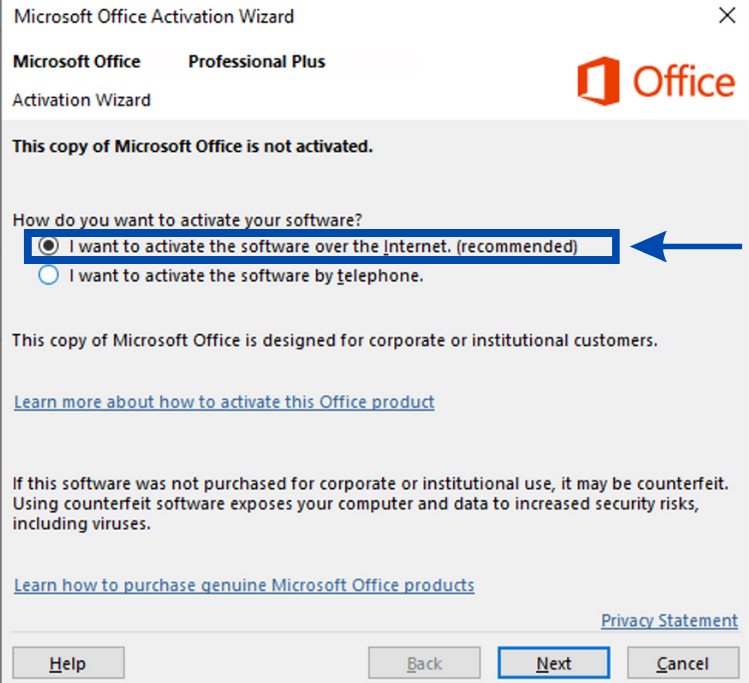
Once the program is installed, the first time you open it you will be asked to enter your Activation key.
Follow the instructions and in a few seconds your license will be activated correctly.
STEP-BY-STEP INSTALLATION
After downloading the EXE file, follow these steps carefully:
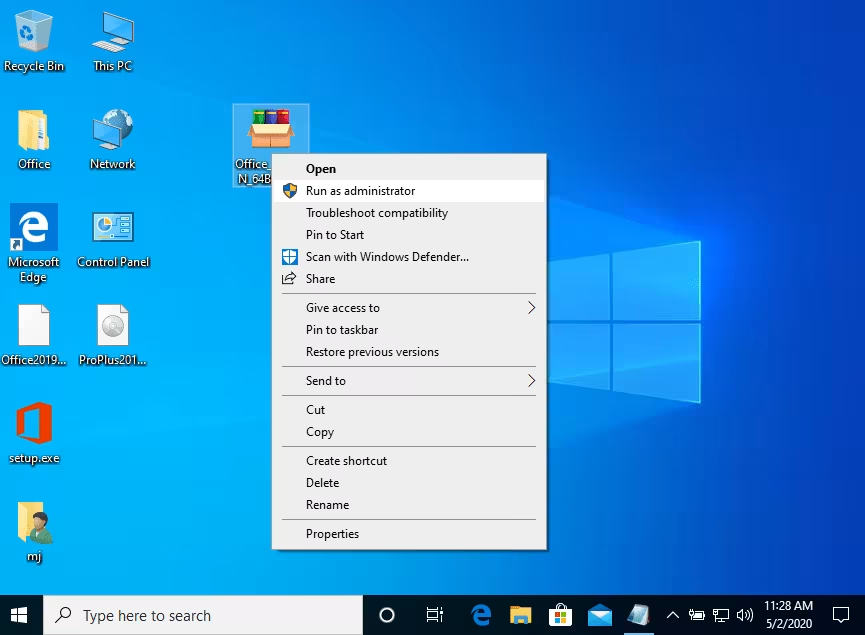
- Haga right click on the downloaded file and select "Execute as an administrator".
- Press "Install" to start the installation.
This process will unzip the installer and configure the program's base files. - Please wait a few minutes until the process is complete.
- Once installed, open Microsoft Project Professional 2024.
- enter your digital activation key when prompted.
- Click on "To accept" o “Activate now” to complete the process.
Your copy of Microsoft Project 2024 Professional will be automatically activated and ready to use.

NOTES AND RECOMMENDATIONS
- Microsoft has phone activation support has been phased outlarvae, nymphs, and adults, so Online activation is the recommended method.
- If you have any problems during installation or activation, please contact our 24/7 customer service.
- To install and activate Project on more than one device, repeat this same procedure on each computer.
- Do not install pirated or modified versions: this can cause license locks and compatibility errors.
We wish you a successful installation. If you need any help, our support team will be happy to assist you at any time.
SEMANTIC KEYWORDS (AI SEO FOCUS)
This content is optimized for AI searches and traditional SEO:
- How to install Microsoft Project 2024 Professional 32/64 bit
- Download Project Professional 2024 in Spanish
- Project 2024 step-by-step installation
- activate project 2024 professional
- microsoft project 2024 requirements
- Project 2024 reinstallable digital license
- microsoft project 2024 windows 11 compatible